Friday at 7:12 pm: you 86 the short rib. At 7:14, three tables still order it because the printed insert is on the table, the server forgot to mention it, and your online PDF is buried in a link nobody opens.
A digital menu only earns its keep if it prevents that exact moment - not in theory, but mid-service, with a line out the door.
This is where “best digital menu for restaurants” stops being a shopping question and becomes an operations question. The best option is the one that lets you change items fast, keeps every table on the same version, protects your brand, and makes life easier for guests who scan a QR code and just want to order.
What “best” actually means for a restaurant digital menu
A digital menu can be anything from a static PDF to a full workspace where you manage items, prices, and translations. The gap between those two is the difference between “we have QR codes” and “we control the menu in real time.”
If your menu rarely changes, a basic setup might feel fine. But most operators live in constant motion: vendor substitutions, seasonal cocktails, weekend specials, and price shifts that can’t wait until the next reprint.
So “best” usually means four outcomes:
First, you can update once and trust that every QR code reflects it immediately - no duplicate files, no versions floating around.
Second, it looks like your restaurant, not like a generic link page. Guests judge the food before they taste it, and the menu is part of that.
Third, it serves every guest, including tourists and diners with allergies or dietary needs.
Fourth, it tells you what’s working so you can sell smarter, not just harder.
Best digital menu for restaurants: the non-negotiables
There are plenty of “nice-to-haves,” but a few fundamentals decide whether a digital menu helps your service or becomes another tool you avoid touching.
Instant edits that don’t break your flow
If you have to open a design program, export a PDF, upload a file, and update links, you do not have a real-time menu. You have a digital poster.
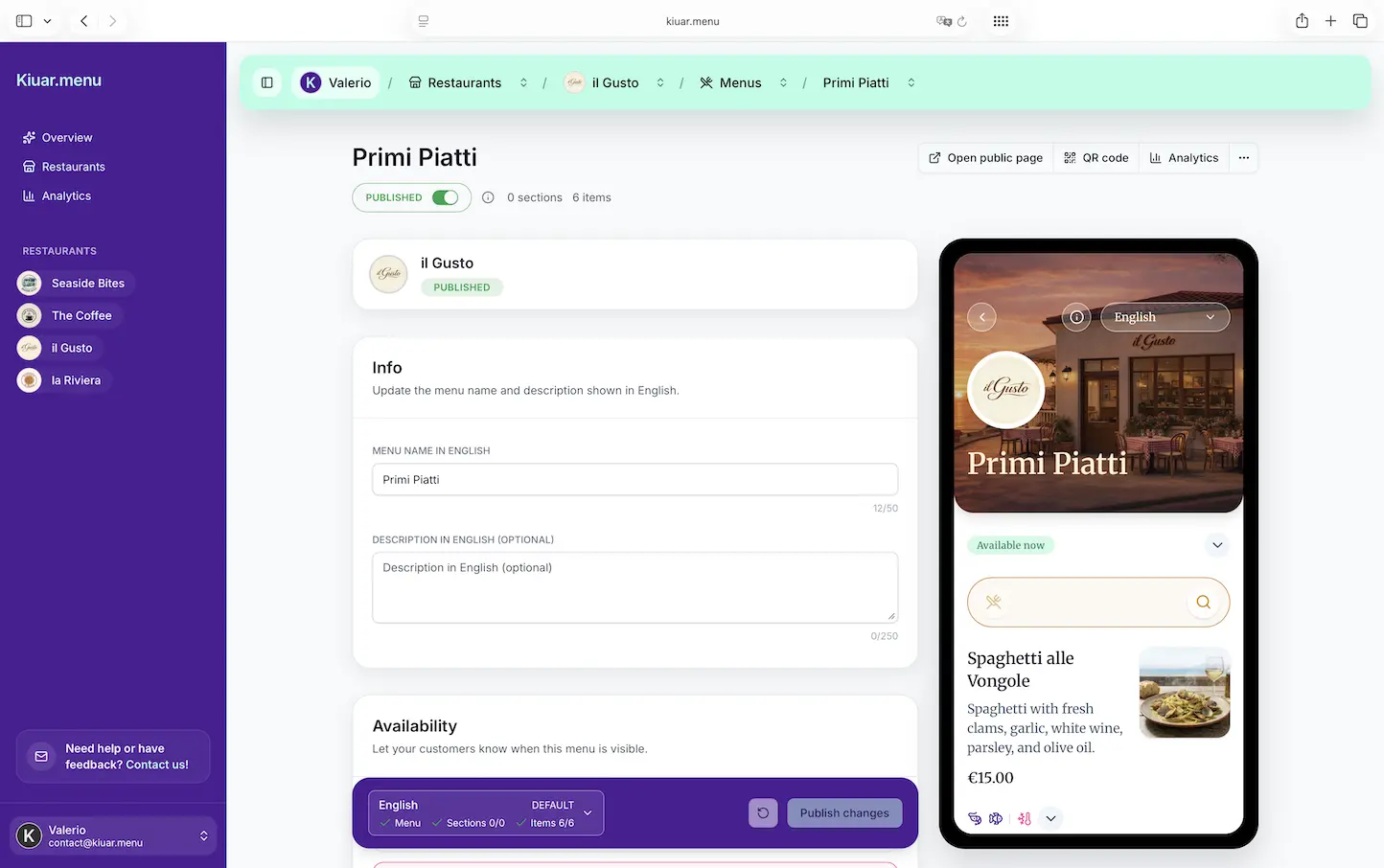
The best systems are built like an operator tool: change the item, hit publish, and every table sees it. This matters most during the rush, when you’re making decisions in seconds and your team needs one source of truth.
Trade-off: the more “designed” your menu workflow is (think graphic layouts), the slower updates usually get. If you’re a tasting menu with monthly changes, that might be fine. If you’re a high-volume bar or pizzeria with frequent 86s, speed wins.
Guest experience that loads fast and reads cleanly
Guests are scanning on older phones, spotty Wi-Fi, and low patience. A digital menu should open instantly in the browser - no app download, no account creation, no weird pop-ups.
Look for readable type, clear section structure, and tap-friendly item layouts. If your guests have to zoom or pinch a PDF, you’ve already lost them.
Trade-off: flashy animations and heavy imagery can slow load times. Photos are great when they’re intentional and optimized, not when they turn your menu into a slow slideshow.
Branding controls that don’t require a designer
“Best” doesn’t mean you need a custom-built website for your menu. It means you can match your brand with simple controls: colors, fonts, logo, layout choices.
Brand consistency matters more than people admit. The menu is where guests decide what to buy, how much to spend, and whether they trust the experience. A clean, on-brand menu supports pricing confidence.
Trade-off: if you want a fully custom layout for every section like a magazine spread, you may need design-heavy tools. Most operators don’t need that. They need a menu that looks like them and updates fast.
Multi-language support that’s actually usable
If you serve international guests (or you’re anywhere near hotels, airports, campuses, or tourist areas), translations aren’t a “maybe.” They’re sales and hospitality.
The best digital menu for restaurants supports multiple languages without you copying and maintaining separate menus. Ideally, you manage one menu and let guests switch languages easily.
Trade-off: translation is only helpful if it’s manageable. If the tool forces you to create separate menus for each language, you’ll stop updating them evenly - and you’ll end up with mismatched pricing or out-of-date items.
Allergen and dietary labeling that reduces risk
Allergen questions slow service, and they’re not optional. A good digital menu gives guests clear markers for common allergens and dietary preferences. That doesn’t replace staff training, but it reduces back-and-forth and helps guests make safer choices.
Trade-off: more labeling requires more setup. But once it’s in place, it saves time every shift, especially for items that rarely change.
What to avoid (even if it looks “cheap and easy”)
Some digital menu setups feel fast at the start and then punish you later.
A static PDF behind a QR code is the classic example. It’s easy to make once, but it’s painful to edit, annoying to read on phones, and it encourages version problems. If you’re doing frequent changes, you’ll end up with “PDF_v7_final_FINAL2.”
Link-in-bio style pages are another trap. They can work for simple lists, but restaurants need structure: sections, modifiers, dietary icons, and a layout that’s meant for ordering decisions.
Also watch for tools that look affordable until you add locations, extra menus, additional QR codes, or languages. If you’re multi-unit or planning to expand, “per location” pricing can turn a small monthly bill into a real expense.
Choosing the right digital menu based on how you operate
Not every restaurant needs the same thing, and pretending otherwise leads to bad buying decisions.
If you run a fast-casual spot with frequent inventory shifts, prioritize edit speed, 86 updates, and a layout that makes decisions quick. Your guests are scanning to order, not to admire typography.
If you run a cocktail bar, you may care more about category flow and descriptions. You still need fast edits, but you might value a more polished presentation and the ability to highlight seasonal menus.
If you run a food truck, the best digital menu is the one you can change on the fly from your phone between stops - and that loads quickly in outdoor conditions where connectivity isn’t perfect.
If you operate multiple locations, “best” is consistency. You want one workspace, controlled branding, and the ability to roll out price changes or item updates without chasing managers across text threads.
The questions to ask before you commit
Most demos look good. The reality shows up during service. Ask questions that reflect your busiest hour, not your calmest Monday.
How long does it take to 86 an item and have it reflected on every table?
Can you update prices for a category in minutes, without rebuilding the menu?
Can guests switch languages themselves, and can you manage translations without duplicating work?
Can you add allergen and dietary labels at the item level?
Do you get analytics on what guests view and what sections get attention?
And the practical one operators appreciate later: can you cancel easily if it’s not delivering value?
A realistic “best” checklist for most operators
For most restaurants, the best digital menu is the one that hits the operational basics without adding overhead. You want a single place to manage content, consistent branding, language support, dietary clarity, and insights you can act on.
That’s exactly the model behind Kiuar.menu: one web-based workspace where you edit once and every QR code updates instantly, with custom branding, translation support (up to 35 languages), allergen and dietary labeling, and menu analytics. The pricing approach is designed to be low-friction - start free, then publish when you’re ready - and subscriptions start at $5.99/month.
Whether you choose that platform or another, use the same standard: if it saves you time during service and reduces menu confusion, it’s paying for itself.
How to tell it’s working after you launch
The best digital menu for restaurants should produce obvious operational wins within the first couple of weeks.
You should see fewer “but the menu says…” moments because the menu is always current.
You should spend less time explaining ingredients and more time hosting, because dietary and allergen details are visible.
You should feel more confident running specials because you can add, remove, or reorder items without reprinting or waiting on anyone.
And ideally, you should learn something from your menu analytics - even if it’s simple, like realizing guests rarely scroll to the bottom, so your best-margin items belong higher.
A digital menu is not a trophy. It’s a control panel. If it doesn’t make you faster, clearer, and more consistent, keep looking.
Closing thought: pick a system you’ll actually use when the dining room is full, your phone is ringing, and you need to change the menu right now - because that’s the moment your “best” choice shows itself.